Electronics

Electronics

Κυριακή 8 Μαρτίου 2015

Bomb!! (For Airsoft Gaming....)

In this circuit I'm presenting you an airsoft bomb, the circuit is based on the excellent code by at instructables but with some minor modifications. I made it for a friend for mine so he can dress up as an terrorist for the carnival. I think the whole concept went quite well. In the circuit we have 3 wires and one button. Button is for adding seconds as more you press it, time is increasing. As for the 3 wires, One (the correct!!!) is for stopping time, the second is for decreasing time faster and the third one is for resetting time.
Basic changes I've made in comparison with ntewinkel's circuit are :
a) Using common cathode displays and not the LTC clock he suggests.
b) I didn't want my arduino to power the displays directly, so i've added some npn transistors.
c) D13 of arduino is an output which you can connect anything when time is over, I've programmed it so it can make a task for a small amount of time (in my occasion power a siren for 2 secs).
d)Add some resistors for more protection.

In the schematic you can find the connections but I'm writing here the values in case you can't read it well.

button:
5v - Button - A5 - 10k Resistor - gnd

crazy wires:
5v - RED jumper wire - A4 - 10k Resistor - gnd
5v - BLUE jumper wire - A3 - 10k Resistor - gnd
5v - YELLOW jumper wire - A2 - 10k Resistor - gnd

Action:
pin D13 is already hooked up to an LED

7 Segment Display   >   Arduino
           A                          D7
           B                          D8
           C                          D9
           D                          D10
           E                          D11
           F                          D12
          G                          A0
          Colon                   D4
          Digit1                   D2
          Digit2                   D3
          Digit3                   D5
          Digit4                   D6

All resistors at the base of transistors are 1K.
Resistors from the emmiter to 7 Segment Display are 220 Ω.
Resistors for grounding A5,A4,A3,A2 are 10k.
All NPN transistors are BC337.

Arduino Code : https://www.dropbox.com/s/sae7erugq1ibzpf/crazy_timer_with_delay.ino?dl=0


Σάββατο 7 Μαρτίου 2015

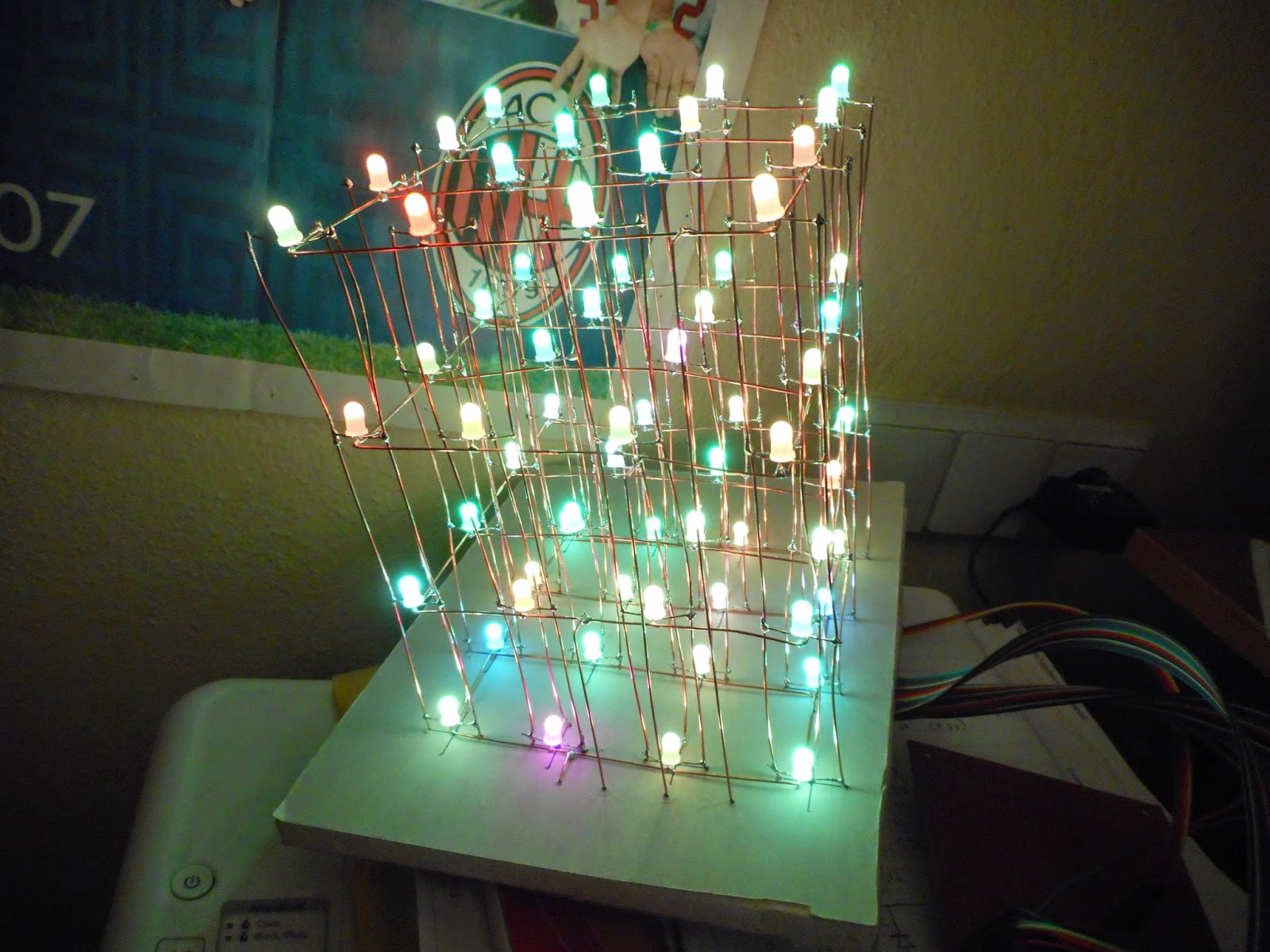
4X4 RGB Led Cube (With Common Anodes Leds)


Based on a wonderful project by GreatScott (https://www.youtube.com/channel/UC6mIxFTvXkWQVEHPsEdflzQ) I had to take a chance to make this cube. With informations Scott is providing the project became even easier to build. The hard part is the connection between the leds, once you finish with that, then in an evening you can complete the project. Based on 3 TLC5940 shift registers, which sink power (connecting to ground), for the cathodes of each color and 4 P-channel MOSFETS for the anodes of each layer and a small arduino you can make wonderful things.


Arduino Code : https://www.dropbox.com/s/z65e7fkgze0o75u/functionByKostas2.ino?dl=0


Πέμπτη 5 Μαρτίου 2015

How To Program Attiny Using Arduino Uno


I had some ATtiny45 around and I wanted to program them as easier I could. After a lot of reading and searching I found 2 marvellous articles, one in instructables.com by How to program attiny using arduino uno" and one by High-Low tech "Arduino board as ATtiny programmer". First of all I made the circuit which is very easy and can be easily done based on these schematics, (pictures are very specific!). What I did was a mix of these 2 articles! First of all below informations are for "ARDUINO 1.05 IDE" which I have installed in my pc, I know for newer versions you have to make a different approach but not very different from mine. Ok! After you made the board :
1) Download the ATtiny core files from : https://github.com/damellis/attiny/archive/ide-1.0.x.zip
2)Locate your Arduino sketchbook folder (you can find its location in the preferences dialog in the Arduino software)
3)Create a new sub-folder called “hardware” in the sketchbook folder, if it doesn’t exist already.
4)Copy the “attiny” folder (not the containing attiny-ide-1.6.x or attiny-1.0.x folder) from the unzipped ATtiny.zip to the “hardware” folder. You should end up with folder structure like Documents > Arduino > hardware > attiny > avr that contains the file boards.txt and another folder called variants. (For Arduino 1.0.x, the boards.txt and other files will be directly in the attiny folder, with no avr sub-folder.)
5)Restart the Arduino development environment.
6)You should see an ATtiny entry in the Tools > Board menu.
7)Open the ArduinoISP sketch from the examples menu.
8)Select the board and serial port that correspond to your Arduino board.
9)Upload the ArduinoISP sketch.
10)CONNECT YOUR BOARD-SHIELD TO YOUR ARDUINO BOARD (Till now you shouldn't have connected it).
11)Go To Tools>Programmer>Arduino as ISP
12)Select your ATtiny from the Tools>Board
13)Select the Blink Example and change this line "int led=13" to "int led=4"
14)Upload It (I got these 2 errors but nothing happened " avrdude: please define PAGEL and BS2 signals in the configuration file for part ATtiny45
avrdude: please define PAGEL and BS2 signals in the configuration file for part ATtiny45")

We have programmed our led to blink from pin4, because if you see the schematic of the ATtiny pin order, that's where we connected our led.

You Are READY!


Τρίτη 24 Φεβρουαρίου 2015

Gas Leakage Detector


One very good circuit, which can detect any gas leakage and inform you if the leakage is big or small through an Lcd screen, Of course we can put any threshold levels and order it to do different actions

Arduino Code :https://www.dropbox.com/s/vsgshsaapgjum8d/gas_detector_me_lcd.ino?dl=0


Control Tv With Ultrasonic Module

Here is a circuit I've made based on an idea by Lucky_Larry, unfortunatelly Eset doesn't allow me to visit his site anymore because of a trojan virus.... Anyway the concept is this : We have an ultrasonic sensor connected to arduino and depending of the distance of our hand & the time we have it in front of the module, it commands the tv to do different operations. So it goes like this (distance is in inches)

A)Wave hand < 10in change Channel Up
B)Wave hand > 10in change Channel Down
C)Hold hand at < 10in Volume Up
D)Hold hand at > 10in Volume Down
E)Hold hand at < 3 in Power Up/Down TV


Of course you have to change the IR codes depending on your tv, but other than that Larry explains his code very well.


Arduino Code https://www.dropbox.com/s/f0gd9pqf148o1g8/control_tv_with_ultrasonic.ino?dl=0

Τετάρτη 4 Φεβρουαρίου 2015

Temperature Sensor

Here is a temperature sensor based on the DS18B20 by Dallas, this little chip can measure the temperature and through a mathematical equation it can convert voltage to temperature. After that we can show our results in celcius or fahrenheit scale. Of course all these are being processed by the AT-Mega 328 MCU (Arduino) though an analog input. In these 2 videos, the first shows our circuit running as a simple sensor. But in the second we set a threshold temperature (20 C) and then an action is being performed (a motor in our occasion).


Arduino code : https://www.dropbox.com/sh/7b270b5feiuu76g/AAAwWr5IAZg66h6xuUfntqNua?dl=0